安装ftp软件在ubuntu上,比较容易,
zhao@zhao-laptop:~$ sudo apt-get install filezilla
[sudo] password for zhao:
正在读取软件包列表... 完成
正在分析软件包的依赖关系树
读取状态信息... 完成
已经不需要下列自动安装的软件包:
libevent1 tsocks
使用 'apt-get autoremove' 来删除它们。
将会安装下列额外的软件包:
filezilla-common
推荐安装的软件包:
filezilla-locales
下列【新】软件包将被安装:
filezilla filezilla-common
共升级了 0 个软件包,新安装了 2 个软件包,要卸载 0 个软件包,有 430 个软件未被升级。
需要下载 1207kB 的软件包。
操作完成后,会消耗掉 3596kB 的额外磁盘空间。
您希望继续执行吗?[Y/n]y
获取:1 http://cn.archive.ubuntu.com hardy/universe filezilla-common 3.0.7.1-0ubuntu3 [258kB]
获取:2 http://cn.archive.ubuntu.com hardy/universe filezilla 3.0.7.1-0ubuntu3 [949kB]
下载 1207kB,耗时 30s (39.6kB/s)
选中了曾被取消选择的软件包 filezilla-common。
(正在读取数据库 ... 系统当前总共安装有 121311 个文件和目录。)
正在解压缩 filezilla-common (从 .../filezilla-common_3.0.7.1-0ubuntu3_all.deb) ...
选中了曾被取消选择的软件包 filezilla。
正在解压缩 filezilla (从 .../filezilla_3.0.7.1-0ubuntu3_i386.deb) ...
正在设置 filezilla-common (3.0.7.1-0ubuntu3) ...
正在设置 filezilla (3.0.7.1-0ubuntu3) ...
zhao@zhao-laptop:~$
2010年5月30日星期日


2010年5月20日星期四
在linux上安装google earth(R)
On my phone (Android based) I use Google maps like crazy (I’d get lost in my own house I’m convinced). It keeps me from getting lost and misdirected. When at home, however, I like to refer to Google Earth to aid me in my quest to know my surroundings a bit better. Now, Google Earth is nothing new. It’s been around for a while and in use by millions. But many people don’t know that Google Earth has a Linux client that can be installed on just about any Linux distribution (so long as it meets the minimum requirements).
In this article I will walk you through the installation of Google Earth for your Linux machine. Once complete, you’ll be zooming around the globe with ease.
Minimum requirements
As always, you should check to make sure your machine meets (or exceeds preferably) the minimum requirements for installation. The minimum requirements are:
- Kernel: 2.4 or later
- glibc: 2.3.2 w/ NPTL or later
- XFree86-4.0 or x.org R6.7 or later
- CPU: Pentium 3, 500Mhz
- System Memory (RAM): 256MB
- Hard Disk: 400MB free space
- Network Speed: 128 Kbits/sec
- Graphics Card: 3D-capable with 16MB of VRAM – Screen: 1024×768, “16-bit High Color” screen
The recommended requirements are:
- Kernel 2.6 or later
- glibc 2.3.5 w/ NPTL or later
- x.org R6.7 or later
- System Memory (RAM): 512MB
- Hard Disk: 2GB free space
- Network Speed: 768 Kbits/sec
- Graphics Card: 3D-capable with 32MB of VRAM
- Screen: 1280×1024, 32 bit color
If your machine meets these, let’s move on.
Installation
You will need to download the binary installation file from the Google Earth download page. Once you have that on your hard drive (let’s assume it was downloaded to ~/Downloads) it’s time to get to work. The first steps are:
- Open a terminal window.
- Change to the ~/Downloads directory.
- Issue the command chmod u+x GoogleEarthLinux.bin to give the file executable permissions.
- Issue the command sudo ./GoogleEarthLinux.bin to start the installation process.
NOTE: If you are not on a machine that uses sudo then remove sudo from the command in line four above and, instead, su to the root user for installation.
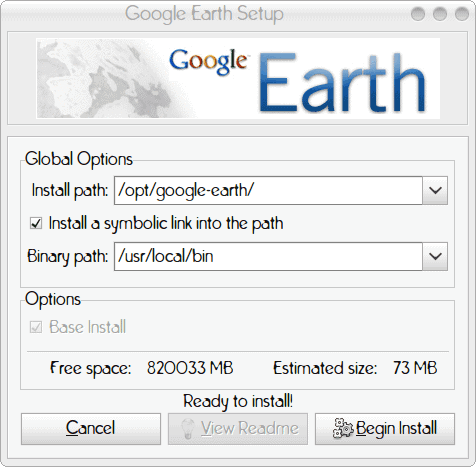
Figure 1
After you issue the command for installation the GUI install window will appear (see Figure 1). In this window you need to configure the
Install path: This is where you want the package to be installed.
Symbolic link: Do you want to create a global executable in /usr/local/bin (You want to do this, otherwise the executable for the application will not be global).
Binary path: Where do you want the symbolic link to be placed.
The defaults, in most cases, should work fine, so click the Begin Install button which will start the installation. The installation should only take a few seconds and you will be ready to go. Upon completion of installation the installer will allow you to start the program by clicking the Start button. If you don’t want to run it then you can always use the command googleearth to start Google Earth.
Final thoughts
In my experience Google Earth on Linux runs as well as it does on any other platform. And, as you can see, the installation is nearly as simple. Do enjoy your Google Earth experience.
订阅:
博文 (Atom)